Operator, Browser Use, Skyvern – we are currently witnessing an evolution of autonomous web browsing agents. The concept of agents is, in general, ubiquitous in the era of AI.
What is an Agent?
An agent is an entity that acts on behalf of another entity – its principal. Robotic agents are modelled after humans: they perceive the world and act in it to achieve a specified goal. Whilst humans perceive through their senses, agents perceive through sensors; whilst humans act through motor systems (e.g., fingers), agents act through actuators. This terminology has been transferred from hard- to software agents, particularly those premised on artificial intelligence (AI). An agent's purpose, that is, its goal, is clearly defined; the principal interfaces with that goal by assigning the agent tasks1.
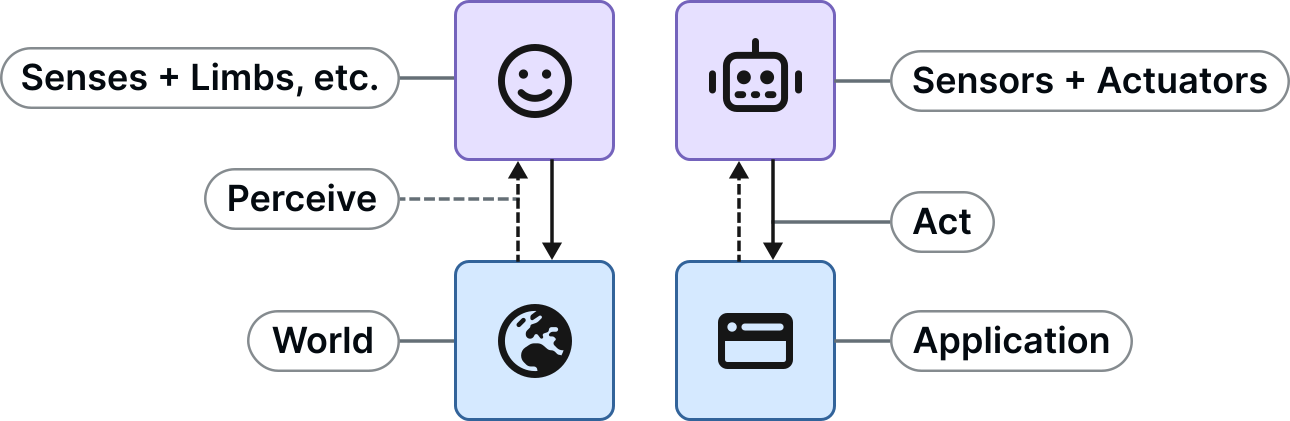
The analogy is more than decorative: an agent takes over the tool-use expertise, leaving the principal with only the domain expertise. Traditional software applications like Photoshop demand both.
What Makes an Agent Intelligent?
For acting on behalf of a human, developing an agent could be as simple as making it follow a hardcoded sequence of actions. This describes process automation, but not an artificially intelligent agent. Whilst definitions for AI differ, agent intelligence comes from making informed decisions that are not hardcoded. Here are common – not necessarily mutually exclusive – high-level approaches to induce intelligence:
- Search – the agent has a complete or heuristic model of the world and the action space to anticipate the effects of actions and search for a goal state.
- Reinforcement learning – the agent has an initial action space and iteratively discovers the world and effects of actions, learning an optimal policy to act in order to reach a goal state.
- Neural networks – the agent has no model, only examples: a network is fitted to task–solution instances and generalises to unseen, yet related tasks.
A Quick Note on Multi-Agent Systems
Agent design gets an additional edge when other entities act in the same world as the agent. Such entities can be considered agents on their own. Their beliefs and goals might affect the agent: cooperative agents share the designed agent's goal, whilst adversarial agents have an opposite goal. In a zero-sum game, an adversarial agent maximises the exact inverse of the designed agent's utility. Knowing this, the designed agent needs to anticipate intelligent decisions by the adversary (e.g., by applying the Minimax algorithm), as opposed to random world changes. That said, web browsing – modelled after humans – is not a typical multi-agent scenario.
The Agent Loop
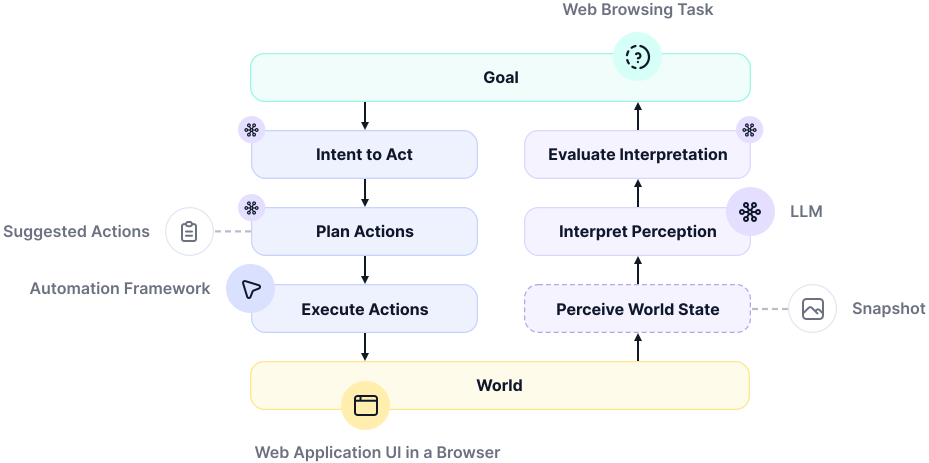
Don Norman's Seven Stages of Action is a model of the human cognition cycle that generalises to an agent's lifecycle – the agent loop: with a (1) goal, (2) intent to act, (3) plan actions, (4) execute the action plan – this alters the world – then (5) perceive the new world state, (6) interpret the perception, and finally (7) evaluate the interpretation – report task success or an irrevocable failure; continue the cycle if the world state not yet reflects a goal state.
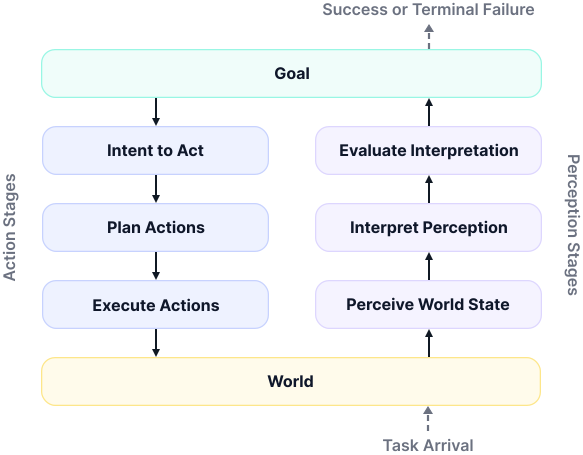
Humans can run many of these cycles hierarchically, with increasing frequency the smaller the task. Take driving a car as an example: choosing a route runs on the order of minutes, choosing when to change lanes on seconds, and holding the car in its lane on fractions of a second. A cycle for holding the lane (1) is: intent to actively hold the lane (2), plan to keep the steering wheel straight, then watch the road (3), execute plan (4), observe the road (5), check whether the car is in the lane (6), if not, cycle again with an adjusted action plan (e.g., slightly rotate the steering wheel to the right) (7).
Errors and Recovery
Precisely speaking, "to err is human" means that errors are inevitable when heuristically navigating the world. Consequently, AI agents regularly run into errors, too. Norman's Seven Stages of Action make two error spaces apparent: when executing an action plan; the Gulf of Action (Execution) – how to act in the world? – and when perceiving world state; the Gulf of Perception (Evaluation) – how to understand the world?
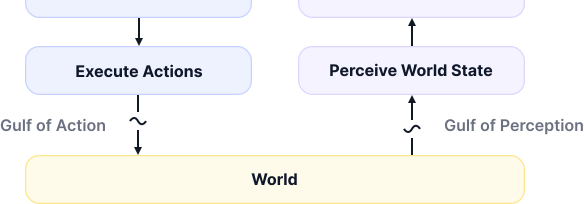
There are two notable kinds of errors within the Gulf of Action: mistakes and slips. A mistake occurs when the action plan is wrong, although executing this action plan might go right in itself. A slip occurs when the action plan is right, but the execution goes wrong. Here is an example: stopping a manual-shift car without pressing the clutch. This error describes a mistake if the driver did not know about the need to press the clutch, e.g., because they only knew how to operate automatic-drive cars. It is, in turn, a slip if they simply forgot to press the clutch because of fatigue. Since cognition cycles are hierarchic, most errors can be recovered within a cycle. Hearing a choking engine sound, the driver might adjust the action plan and press the clutch late. Errors that cannot be recovered – picture the car's engine dying – require adjusting the goal, which can be seen as moving on to a new cycle.
Web Browsing Agents
The advent of large language models (LLMs) has recently opened a new perspective on developing web agents – falling back on the neural networks approach to intelligence. An LLM can serve as a plug-in reasoning backend: given a task and somehow encoded UI state, it can suggest input actions – type and target, e.g., click at (200, 375) – that progress the given task. Moreover, it can decide whether a goal state has been reached. Providing a state-and-action history within context conveys to the model prior outcomes and contributes to in-context learning.
Web Browsing is All About the Journey
A web browsing task is any task that can be solved through a web-based user interface (UI). For instance: "Book the cheapest flight from Amsterdam to New York tomorrow night" on klm.com. Application programming interfaces (APIs; e.g., REST APIs) are often restricted, incomplete, or unavailable. For that reason, web browsing agents today have to rely on human-facing web application UIs. Many agent use cases, such as for customer experience, even require a human in the loop. In this context, web browsing agents come at two levels: outcome-driven agents care only about reaching a goal state, which favours shortcuts like direct URL navigation or expert navigation like Ctrl + F, whilst journey-driven agents are supposed to browse a web application in human fashion, via the application-native UI.

A Formal Model for Web Browsing
The world of web application UIs is hard to formalise; a complete model spans the union of every reachable UI state in every web application on the web. For that reason, conventional AI has failed to produce capable generalist web agents. From a web agent design perspective, however, an abstract model of web browsing is sufficient.
Web browsing might afford a model that is history-independent. A human could certainly pick up a partially completed browsing task. For example, completing the payment process on an airline website for an already selected flight – assuming prior actions were correct with respect to the specified task (e.g., the selected destination).

Yet, many web applications lack visibility of system status – against Jakob Nielsen's first heuristic for UI usability. Visibility of system status comprises reflecting both outcomes of prior actions and affordances for next actions in the UI. With this concept, web browsing is best described as a partially observable Markov decision process (POMDP)2 with, adapting to discovered UI states, where states can be tuples of UI state trajectories to contain history.
Reflex agents take actions that solely depend on the current world state. Planning agents, in turn, plan ahead. For most web browsing tasks, future UI states are roughly predictable, given that web journeys are similar across different web applications that help with similar tasks. In POMDP terms, the expected next UI state has a high probability, whilst unexpected states remain with a non-negligible probability. The further a web journey is progressed, the higher the probability of the next expected UI state gets: the flight selection step is likely followed by the passenger details step, which is even more likely followed by the payment step.

LLM + Sensors + Actuators = Agent
Conversationally satisfying simple information requests does not reasonably qualify an LLM as an agent – no more than it would a TF-IDF search system3, or a colleague telling you the time. The web agent LLM backend is metaphorically the brain of the agent. It abstracts the world model and state transition function, and can decide whether a goal state was reached.
Turning an LLM into a web agent means, at the core, connecting it with sensors and actuators, for example, the ability to take DOM snapshots and dispatch clicks via CSS selectors. This is a specialised architecture of LLM tool calling. The set of available input actions is known from human computer use: clicking, typing, scrolling, etc. The agent loop is then a continuous cycle of serialising UI state for the model to elicit action suggestions under a goal derived from the user-specified task.
Snapshots – Serialised UI State
There are plenty of ways to serialise the state of a web-based UI – referred to as a snapshot. A screenshot resembles what humans see when viewing a web page's graphical UI (GUI) at a given point in time. That said, a UI can be represented in versatile ways. LLMs have demonstrated the ability to interpret HTML and even navigate a UI encoded in this way4. The document object model (DOM) is a web browser's runtime model of a web page. Serialised as HTML, to that effect, DOM snapshots represent a compelling alternative to GUI snapshots, offering certain advantages, such as processability (e.g., filtering). Filtering the DOM by pruning hidden, disabled, or redundant subtrees saves LLM communication costs and works towards more stable and predictable journeys.
Outcome-driven web agents have used UI-invasive snapshot measures, such as grounding LLMs with bounding boxes around actionable elements.

The ideal snapshot representation depends on the task. To get an idea, classify between navigation and information retrieval tasks: navigation tasks require snapshots to preserve actionable elements, whilst retrieval tasks require them to preserve text – both can be sourced from DOM snapshots. Accessibility tree snapshots are another DOM-sourced representation. Web UIs rarely afford merely a single task, so many of their components are noise in any given snapshot – which is not just a UI serialisation, but one scoped to the task at hand. GUI snapshots become a necessity when the target application is graphics-based, such as a canvas-based application like Google Maps.
A snapshot impacts the width of Norman's Gulf of Perception: if a relevant element is omitted or diffused, the model is hindered in identifying correct actions to progress a web browsing task. The Gulf of Action mostly grows when the snapshot-encoded UI state and the live UI state have irrecoverably drifted apart. The agent loop should be fast to prevent such drift. The Gulf of Perception is much wider by the nature of the problem: what snapshot representation can an LLM interpret, and which representation is best?
Targeting – Action Suggestions
An action is a user event, such as click, type, or scroll, targeting a specific element in the UI. The set of available actions thereby is defined by the accepted user input types which are generally derived and standardised over the mouse and keyboard devices.
The type of snapshot representation provided to an LLM dictates how an element can be targeted for an action. Vision-based, geometric targeting is indirect and absolute, i.e., by coordinates. DOM-based targeting is direct and relative, e.g., by CSS selectors or object references. Relative targeting remains valid if the UI shifts between snapshot and action time. A shift can happen due to many reasons, for instance, a lazy-loaded image.
The Agent Harness
Any custom logic that sits between the LLM backend and the web page UI (problem world) is considered an agent harness – often linguistically equated with the agent in general. Common aspects of a harness include task decomposition, model routing, snapshot creation, history management, error recovery, and timeouts. System prompts are also part of the harness, instructing a general-purpose LLM to model a web agent for a specific domain – right in context.
Designing a harness is where the POMDP and Seven Stages of Action models come into play. The POMDP model helps with context engineering, for instance, how much history to provide to the LLM. The Seven Stages of Action set out problem components and artefacts, for example, the LLM or snapshots, respectively.
The Model Context Protocol
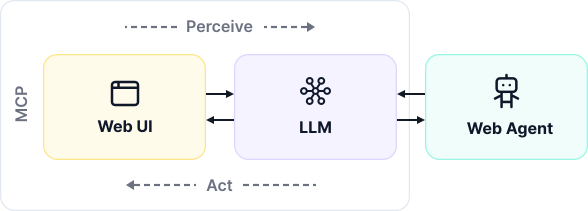
LLM providers commonly offer a structured output interface, which allows eliciting well-formed action suggestions from an LLM. A client can subsequently parse and drive these suggested actions in the live user interface. Through the model context protocol (MCP) – another web-based RPC standard – structured output can be bridged with tools that LLMs can call directly, without an extra client trip.
Web Browser Environments
When connected to web perception and actuation tools via MCP, an ordinary AI chat UI already qualifies as an agent UI; the MCP integration decides where the actual web browser runs. There are several types of browser runtime environment:
- Agentic browser – the agent's UI embeds a browser.
Example: Perplexity Comet - Cloud browser – the agent spins up a browser in the cloud.
Example: Browserbase - Local browser (3rd-party browser) – the agent spins up an isolated browser locally.
Example: Chromium + Playwright - Local browser (1st-party browser) – the agent is embedded within a web application running in a user's personal browser, e.g., in the form of a chatbot.
- Implemented (1st-party app) – served directly through the website.
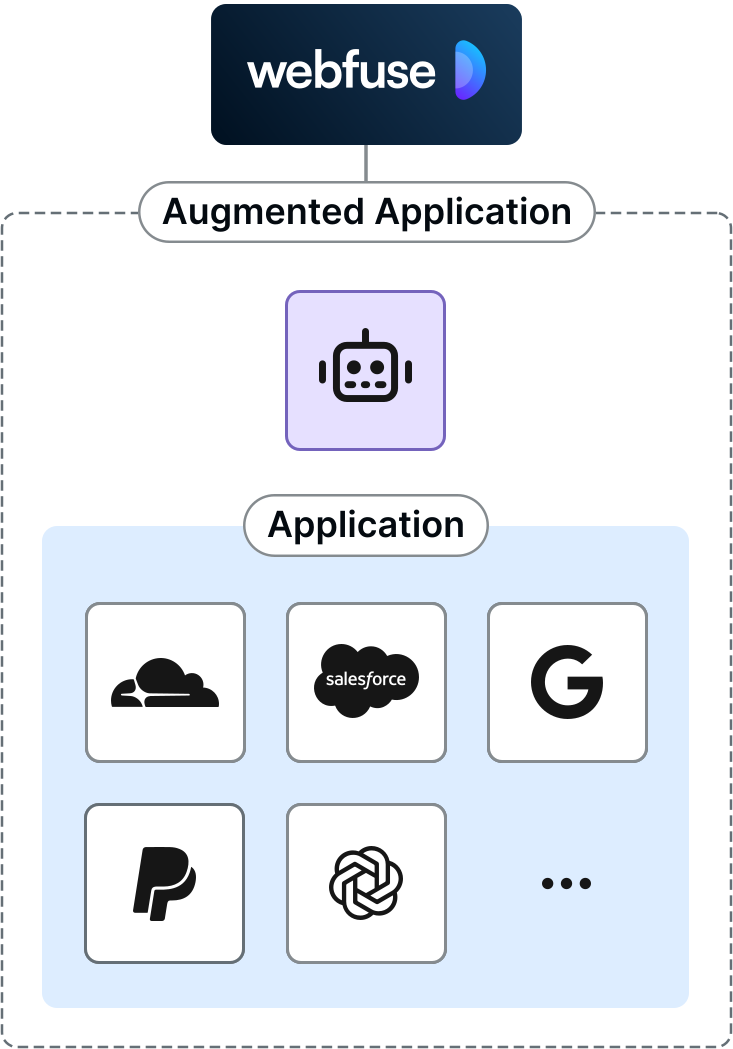
Example: Cognigy Studio - Augmented (3rd-party app) – served indirectly through a website proxy.
Example: Webfuse
- Implemented (1st-party app) – served directly through the website.
Building AI agents has been approached from different angles. LLMs have opened up new perspectives on the design and development of AI agents, particularly web agents, which work in a problem domain that is hard to grasp with a formal model. Whilst higher-level agent methodology can borrow much from established research, LLMs have introduced new challenges, such as how to take UI state snapshots for eliciting input action suggestions from such models.
At Webfuse, we research agentic web browsing and develop a platform for agentic browsing. Our web application reverse proxy allows LLMs to perceive and act on the live web. Use cases include connecting a chat UI like Claude, or shipping perceive-and-act-ready chatbots.
Footnotes
- https://inst.eecs.berkeley.edu/~cs188/textbook/textbook_full.pdf ↩
- A POMDP is a decision process in which the agent cannot see the exact world state, only partial observations of it, and so must choose actions against a probability distribution over the states it might be in. ↩
- TF-IDF (term frequency-inverse document frequency) is an information retrieval method that ranks documents by how often a query term occurs in each one, weighted down by how common that term is across the whole collection – so terms that are frequent here but rare elsewhere carry the most weight. ↩
- https://arxiv.org/abs/2210.03945 ↩

Next Steps
Connect an agent to any web app
No signup, runs in your browser
Related Articles