The web – as the metaphor suggests – is all about links between documents hosted on otherwise independent network machines: personal computers and web servers. A link is usually followed, transitioning from one website to another. However, such a link can also be resolved within a website, by embedding another website for simultaneous display.
The iframe – A Window to the Web
In the dial-up era of the internet, a single website load could take several tens of seconds. Before XHR and cache-control headers, Microsoft came up with a solution to build modular websites and reduce redundant loading of resources: inline frames to embed external websites, which would later become a web standard in the form of the iframe element. An inline frame loads a website into a controlled viewport within the user interface (UI) of another website.
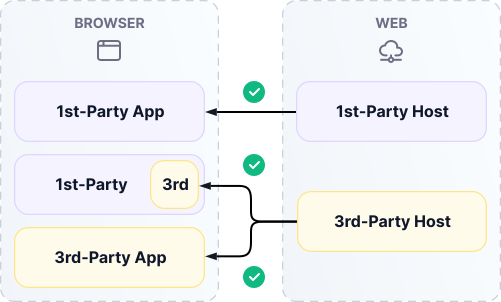
Today, iframes are primarily used for embedding third-party web applications. Most web applications have been developed for direct use and hence do not provide an API for external integration. That means embedding via iframe represents the only standard integration interface.
Here is a popular use case: embedding interactive maps – a rich application that would not justify individual development for a narrow feature – for example, showing store locations or a destination for routing.

Limitations of the iframe Element
Working with iframe elements, you might have come across an error message in your browser saying a specific website cannot be embedded.

Web browsers are designed to protect the user from malicious websites. Embedding via iframe is generally safe, as the websites' contexts are rigorously isolated from each other. A website provider might, however, not want any other website to embed theirs.
The Content-Security-Policy: frame-ancestors or the legacy X-Frame-Options response header lets website providers control whether or not they want to allow external embedding. From an embedder perspective, the effect of these controls can be abstracted under a simple boolean embed policy: yes or no.
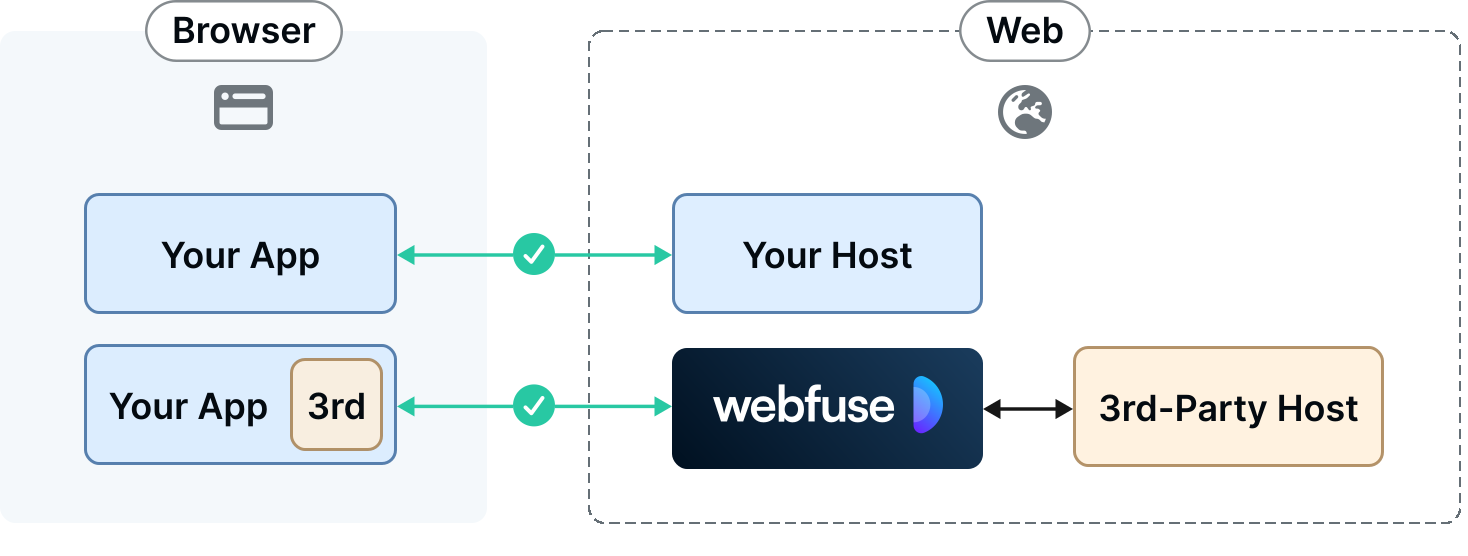
Web Proxies: Embed Anything
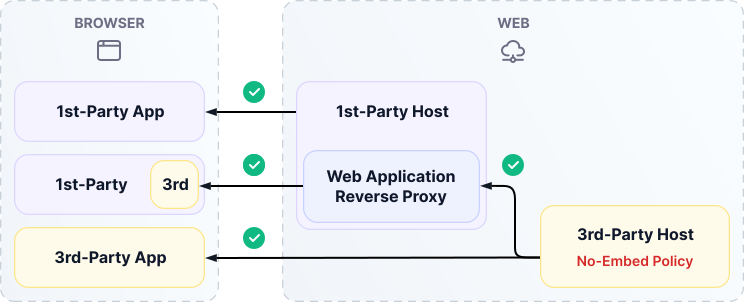
Regardless of the embed policy, an end user can always open a website directly – that is, unembedded. It then loads in a first-party host context. In other words, an explicit no-embed policy can only take effect when a website is embedded and opened in a third-party host context.
With that in mind, a no-embed policy is no dead end for an embedder. An embed-restricted website could always be loaded into a first-party host context and then proxied as-is to the embedding website – without the no-embed policy headers. The intermediate service is a web application reverse proxy (in this context shortened to web proxy).
Developing a Web Proxy Is a Hard Problem
The web proxy technology sounds straightforward: forward a request and return the response, rewriting certain headers (e.g., X-Frame-Options). The reality is that developing and maintaining a web proxy is a hard problem.
A forwarded website's host context is now different from its original host context, namely the proxy host context, which may or may not correspond to the embedder's host context. This causes many cases of behavioural divergence. Here is an evident one:
Original Host Context (3rd, uncontrolled):
console.log(document.location.hostname) // "google.com"
Embedder Host Context (1st, controlled):
console.log(document.location.hostname) // "embed.example.org"
This explicit case of document.location is implicit in many more APIs, such as the CookieStore API.
Hardcoded URLs, such as in src or href attribute values, are another common source of proxying issues.
Webfuse – Web-proxy-as-a-service
At Webfuse, we develop a drop-in web proxy solution.
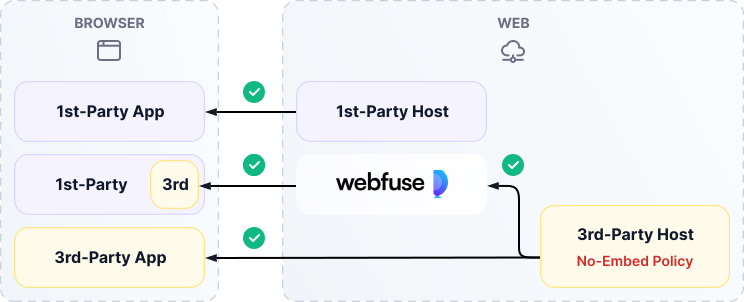
Webfuse solves the basic embedding problem without configuration, and supports a wide range of use cases. The broadest use case is digital adoption: serving existing web applications through a single, consolidating application.
Using Webfuse for Extra-Secure Embedding
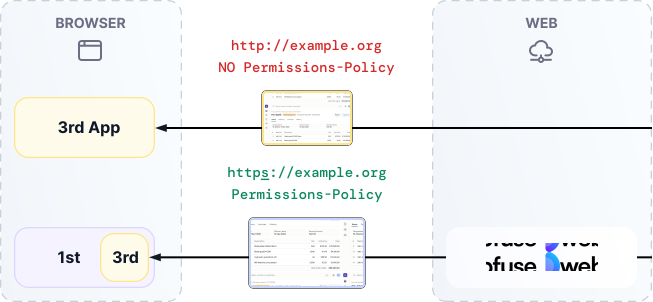
A website embedded via iframe is served exactly as it would be if loaded directly in a first-party context. Even if an external website allows for embedding, it might come with low security standards, such as being served over HTTP rather than HTTPS, or without strict permissions-policy headers that would restrict application access to user devices (e.g., the microphone).
Webfuse allows for rewriting application-layer security measures. For instance, a legacy enterprise resource planning (ERP) application could be served through Webfuse to upgrade the transport to HTTPS and override outdated headers – as an alternative to full re-development.

Using Webfuse for Augmented Embedding
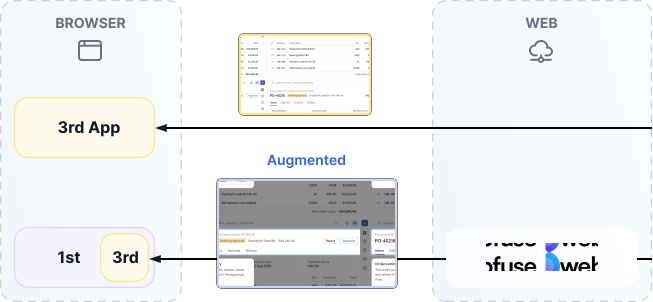
Manipulating a website request or response header is, technically speaking, a protocol-level augmentation. Webfuse enables augmenting the web application's UI itself, too.
The example ERP application could be enhanced with an authentication interface, redaction of sensitive information, or highlighting of elements as part of an onboarding journey.

Many websites benefit from embedding other websites to naturally extend their functionality. There are plenty of use cases. Whenever a website does not allow embedding, a web application reverse proxy is a required service component.
Webfuse is a web-proxy-as-a-service that solves more than just the universal embedding problem: augment any embedded website with custom functionality – for security and extra features.

Connect an agent to any web app
No signup, runs in your browser
Ready to let your AI agent act on the live web?
Headless browsers give your agent a copy of the web. Webfuse gives it the session your user is actually in — over MCP, with no install.
- No credit card
- Free forever plan
- Quick setup