Five tools let an AI agent see a live web page and act on it for the user: Webfuse, Cobrowse.io, Alibaba Page Agent, Skyvern and Browserbase.
The main difference between them is whose browser the agent acts in. Webfuse, Cobrowse.io and Page Agent act inside a session the user already has open, though Cobrowse and Page Agent need code deployed into the page first. Skyvern and Browserbase run a separate browser and stream it back, though Skyvern can also drive a Chrome already open on the user's machine.
That choice sets the latency, what the user sees while the agent works, where the logged-in session sits, and whether the tool can reach software you do not control.
TL;DR
Three of the five act in a session the user already has open. Webfuse through a proxy, Cobrowse.io through an SDK in the application, Page Agent through a script tag in the page. Webfuse is the only one that needs nothing installed on the target site.
Skyvern and Browserbase run their own browser. Both stream the session back and can pass control to a person mid-run. Neither needs anything added to the target site.
Page Agent is the cheapest way in. MIT licensed, free, and limited to sites you control.
Reach decides the shortlist. Sites you own: Page Agent or Cobrowse.io. Sites you don't: Webfuse, Skyvern or Browserbase.
The five tools compared
Install requirements follow from the browser choice: the two tools that need code in the page are also the two that cannot reach a site you do not own.
| Tool | Whose browser | Install needed | Sites you don't own |
|---|---|---|---|
| Webfuse | The user's own | None | Yes |
| Cobrowse.io | The user's own | SDK | No |
| Alibaba Page Agent | The user's own | Script tag | No |
| Skyvern | Its own | None | Yes |
| Browserbase | Its own cloud | None | Yes |
Where the agent runs decides what breaks
Most of the difficulty in this category sits in execution rather than reasoning. A current model can plan a five-step task on a bank portal without much trouble. Getting those five steps to land on a real page, in the right order, on a component that has finished rendering, is the part that fails.
An agent acting in the session the user already has open inherits that session's cookies, its authentication state and its rendered DOM. An agent in a fresh remote browser starts from nothing and has to be handed credentials, which moves the security question from the user's machine to somebody's server.
Voice tightens the same constraint. A cross-linguistic study of ten languages published in PNAS found that people hand turns back to each other within roughly 200 milliseconds, and later work places the point where a gap starts reading as hesitation at around 700. That leaves a working ceiling near 800 milliseconds, which is where the current benchmark for voice systems sits. Recognition, model inference and synthesis consume all but roughly 50 milliseconds of it. A single network round trip costs 50 to 200 milliseconds, so adding one per click overruns the budget before the agent has done anything.
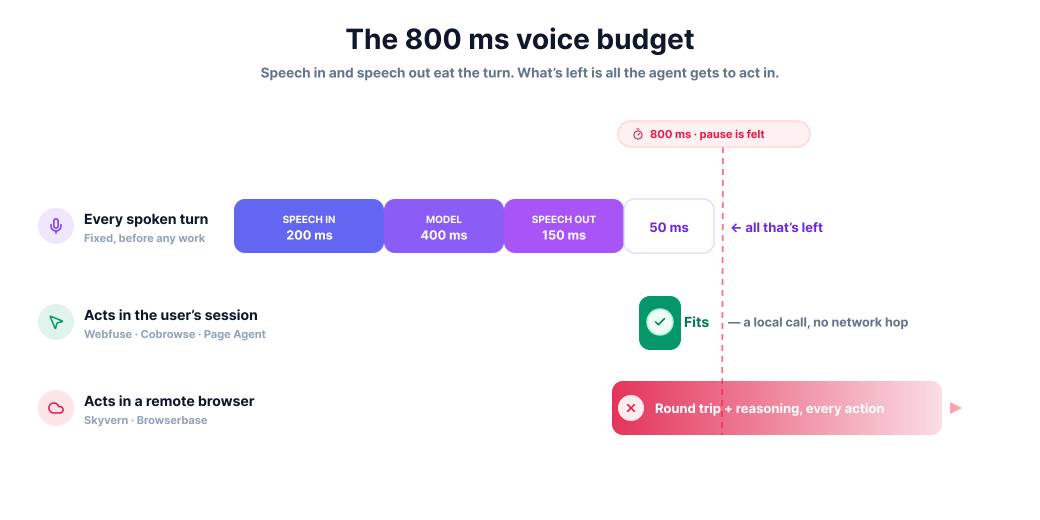
Each architecture then fails in its own way, and none of them fails on a demo:
- A remote browser handles a stable public site, then stalls the first time a flow depends on a one-time code sent to the user's phone.
- An in-page script handles the happy path, then acts on a button React has rendered but not yet wired up.
- A vision-driven agent copes with a redesign, then misreads two adjacent buttons with similar labels.
All three show up in week two.
Which machine holds the authenticated session follows from the same choice. With the in-session tools, cookies, tokens and local storage stay in the user's browser and the agent operates against them without a copy being made — for a bank or an insurer, that removes a category of question from the security review, since no credential ever moves. A remote browser starts unauthenticated, so either credentials are handed over or the login is handed to the user, which is what Browserbase's Live View credential handoff does.
The same split decides what the user sees. With Webfuse, Cobrowse.io and Page Agent, fields fill in view and the page scrolls on the device that was already rendering it — nothing is streamed, so bandwidth stays low and the response is immediate. With Browserbase Live View and Skyvern's livestream, the window is genuine and interactive, and frame rate, network conditions and the round trip all sit between the person and the page.
Teams usually land on the streamed version by picking infrastructure first. A customer watching a video of a browser doing their paperwork is a different product from a customer whose own screen fills in as they talk, even when the task and the finishing time are identical.
Webfuse
Webfuse is our own product. It is a proxy-based augmentation platform that lets an AI agent see and act on any website, including software the operator does not own, with nothing installed in the target application.

How it works
A configurable proxy sits between the user's browser and the target site. When a page is requested, the proxy injects a virtualization layer that sandboxes the application and opens it to programmatic control. Agent logic then runs inside the user's own session rather than on a remote machine, so a click costs no network round trip once the session is live.
The Automation API splits in two:
- Perception —
domSnapshot(),guiSnapshot(),accessibilityTree() - Actuation —
click(),type(),scroll(),select(),keyPress()
Timing is handled by the layer rather than left to the caller. Webfuse "buffers perception calls if and as long as the page is undergoing a significant UI shift", and an actuation call set to wait for its target will "keep trying to resolve the target until it exists or until a five-second timeout is reached". Targeting "is able to pierce shadow root and even iframe boundaries", and cross-frame snapshots inline the contents of every iframe.
What comes with it
Governance is where the proxy position pays off, since every request and every action passes through one place. That produces a set of controls an in-page script cannot offer on its own.
- Visual audit trail and session recording covering what the agent did and what the user saw.
- Policy enforcement restricting which elements the agent is allowed to touch.
- PII masking applied before a snapshot reaches the model.
- Human handoff into the same live session, with co-browsing, so a person can finish what the agent started.
- No code access needed on the target application, and no DNS or infrastructure change asked of its owner.
Where it stops
The origin server sees requests from Webfuse rather than from the user, so some applications need an IP allowlist. Domain rewriting means an existing session token has to be migrated deliberately rather than carried over by accident. And the proxy itself is a trust relationship, which makes it a security and compliance decision rather than a purely technical one.
Product tours are recorded once, then go stale.
Webfuse guides users in the live session.
Cobrowse.io
Cobrowse.io is a co-browsing and remote control platform for support teams, and its AI Virtual Agent Co-browse feature extends that same session access to virtual agents.

The product has been solving the human version of this problem for years, which shows in how the permissions are arranged. An agent cannot simply seize the page. Cobrowse's documentation is explicit that an agent "may not set the remote control state to on directly, they can only set it to requested and the user must approve if required", and a consent dialog appears by default.
Once granted, remote control covers real work rather than pointing:
- co-filling forms with the customer
- moving the customer to the correct URL
- troubleshooting and finishing multi-step tasks
- full device remote control, reaching problems that sit outside the application
- drawing and annotation tools for guiding someone visually
The AI virtual agent inherits the same real-time visibility of what the customer sees.
Cobrowse's public documentation describes remote control from the perspective of human agents. How much of the clicking the AI performs by itself, versus how much it annotates and escalates, is not spelled out publicly. Ask that directly if you are evaluating it for autonomous guidance.
Bounds: the SDK has to be inside the web or mobile application, so Cobrowse reaches properties you control and nothing else. The consent step adds friction to every session, and it is also the tightest governance model in this list.
Best fit: a support organisation that already runs assisted sessions and wants an AI agent working inside the same permission structure its human agents use. Mobile SDK coverage matters here too, since most of this category is web-only and a sizeable share of support traffic is not.
Alibaba Page Agent
Page Agent is an open-source in-page GUI agent that operates a web interface from natural language instructions, running as ordinary JavaScript inside the page. Installation is a single line from a CDN, or npm install page-agent. The project's own summary of the approach is blunt: "No need for browser extension / python / headless browser. Just in-page javascript." An optional Chrome extension extends it across multiple tabs.
It reads the page through text-based DOM manipulation rather than screenshots, which keeps token cost down and avoids the coordinate-guessing failures that come with pixel-level vision. It is model-agnostic, working with mainstream hosted models and with locally deployed ones, so the whole loop can stay on infrastructure you run.
The repository carries an MIT licence, around 28.6k stars and roughly 1,119 commits on main. MIT permits commercial use and modification with no reciprocal obligation, so a product team can ship Page Agent inside a paid application without a legal review — the cleanest licensing position of the five, and a real difference against Skyvern's AGPL-3.0.
Two limits shape where it fits:
- Scope. The project states its own as "client-side web enhancement, not server-side automation".
- Deployment. The script has to be in the page, which confines it to your own properties and rules out anything you cannot deploy code into.
There is no takeover mechanism, no audit trail and no masking layer supplied, so governance is yours to build.
Best fit: a product team adding guided onboarding or in-app help to software they already deploy, with engineering capacity to handle the parts the project leaves open. It is the fastest route from nothing to a working in-page agent, and the weakest option for a regulated flow that needs an audit record.
Skyvern
Skyvern automates browser workflows with vision models and a group of coordinating agents, and it can drive either its own browser or a Chrome already running on someone's machine.

The design choice at its core is stated in the repository: "Instead of only relying on code-defined XPath interactions, Skyvern relies on Vision LLMs to learn and interact with the websites." Layout changes that would break a selector-based script tend to survive that approach. The project describes using "a swarm of agents to comprehend a website, and plan and execute its actions".
Deployment is unusually flexible. Four modes are available.
- Skyvern Cloud, managed at app.skyvern.com.
- Local deployment with its own browser instances.
- Remote control of a local Chrome over the debugging port.
- Cloud-to-local tunnelling, with Skyvern Cloud driving a Chrome on the user's machine.
For oversight it livestreams the viewport, in its own words, "so that you can see exactly what Skyvern is doing on the web... and intervening when necessary".
Three things to settle before it goes near a customer-facing flow:
- The licence is AGPL-3.0, copyleft, which means a legal review for anyone embedding it in a commercial product.
- Reasoning about every step costs time, so it sits outside the budget for sub-second voice guidance.
- Attaching to a local Chrome means software on the user's machine, which is a different proposition from sending a customer a link.
Best fit: an internal operations team automating multi-step work across sites that change often, with someone available to watch the livestream and step in. Self-hosting suits organisations that cannot send page contents to a third party, and the licence terms decide whether that option is open to them.
Browserbase
Browserbase is cloud browser infrastructure for agents, with a Live View iframe that lets a person watch a run and take the controls.

The platform describes itself as "the complete platform to build and deploy agents that browse and interact with the web like humans", bundling cloud browsers, web search, page fetching, a sandbox runtime and model integrations behind one API key. Playwright, Puppeteer and Stagehand all attach to it.
Live View is the part that makes it relevant to guidance rather than pure automation. It is an interactive window into a running session where a person can "watch, click, type, and scroll in real-time", embedded through an iframe in either read-only mode, using pointer-events: none, or read/write for actual control. The documented human-in-the-loop cases are practical ones: handing credential entry to the end user, dealing with awkward iframes, and file uploads.
The arrangement is the inverse of the in-session tools: the agent owns the browser and the human is invited in as a guest. That suits a task the agent runs unattended and a person occasionally rescues. For walking someone through their own account, on their own screen, at conversational speed, every action still travels to a data centre and back.
Best fit: an engineering team that wants agent browsers without running them, and whose human-in-the-loop requirement is occasional rescue rather than continuous guidance. Teams already committed to Playwright or Stagehand get the shortest migration path of anything here, since the automation code carries over unchanged.
Three products that do not belong here
Three well-known products fail the same test: they answer questions and call APIs, but none of them operates the visitor's page.
Fin, renamed from Intercom in May 2026, is the strongest AI support agent of the group, resolving roughly 76% of requests autonomously by its own figures. It answers and reaches backend systems through integrations. It does not click, scroll or type in the visitor's browser. Salesforce signed a definitive agreement to acquire it on 15 June 2026 for around $3.6bn, expected to close in Salesforce's fourth fiscal quarter of 2027 subject to regulatory approval, with the technology folding into Agentforce.
Tidio and Voiceflow sit in the same category, one as an SMB support widget, the other as a builder for conversational flows. Both can trigger actions through APIs. Neither clicks, scrolls or fills a form in the visitor's browser.
MultiOn has moved. The company rebranded to AGI, Inc. and shifted its centre of gravity to a personal agent spanning phone and laptop, though the developer web-action API remains active and widely used. The pivot away from browser guidance is what takes it off this list.
What to test before committing
Vendor demos in this category run on cooperative pages, and the differences between these tools only surface on uncooperative ones. Five tests separate them quickly.
- A component that renders before it works. Point the agent at a React or Angular form and have it type into the first field the instant the page appears. Tools that track framework state wait. Tools that poll the DOM fire early and lose the input.
- A closed shadow DOM or a cross-origin iframe. Payment fields and embedded widgets live here constantly. An agent that cannot read across the boundary reports the page as empty.
- An interruption. Have a person take the mouse mid-task. Watch whether the agent notices, waits, and resumes from the new state, or carries on against a page that has moved underneath it.
- A one-time code. Trigger a flow that sends an SMS or an email code. This is where remote-browser setups either hand off cleanly or stop dead.
- The same run, audited afterwards. Ask what record exists of what the agent did. Some of these tools produce a replayable session. Others produce log lines you have to reconstruct.
Time each test as well as passing it. A tool that completes all five at three seconds per action is a different product from one that completes all five at 300 milliseconds, and only one of them can carry a voice conversation.
Choosing between them
Reach eliminates most of the field immediately. What remains is decided by how much oversight and governance the situation demands.
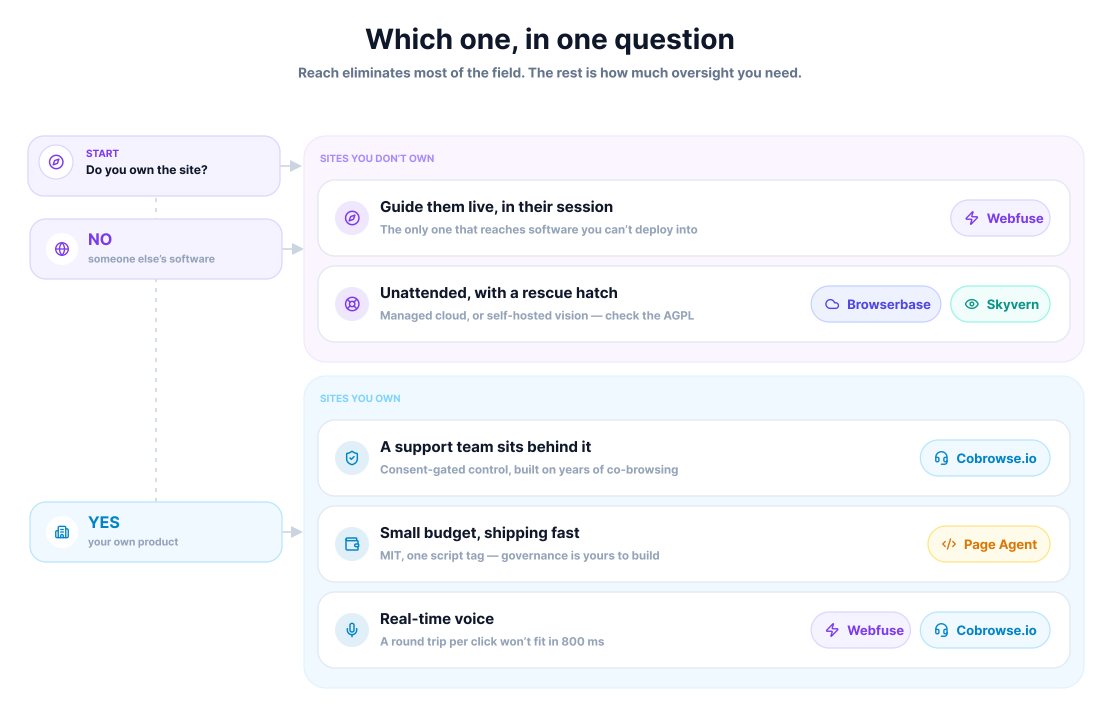
- Guiding users through software you do not own. Webfuse is the only option that needs nothing installed on either side, since Cobrowse and Page Agent both need code inside the application, and Skyvern's local-Chrome mode needs remote debugging enabled on the user's own machine.
- Guiding users through your own product, with a support team behind it. Cobrowse.io, for the consent model and the years of co-browsing behind it.
- Guiding users through your own product, on a small budget. Page Agent, accepting that governance is yours to build.
- Unattended tasks with a human safety net. Browserbase for managed infrastructure, Skyvern for vision-driven resilience and self-hosting, with the AGPL licence checked first.
- Real-time voice guidance. In-session execution, for the latency reason, which narrows it to Webfuse or Cobrowse.io depending on whether you own the application.
These boundaries move. Page Agent did not exist in a usable form two years ago, Cobrowse extended remote control to virtual agents only recently, and Skyvern's cloud-to-local tunnel opened a route that did not previously make sense. Expect to revisit the decision within a year.
Frequently Asked Questions

Next Steps
Connect an agent to any web app
No signup, runs in your browser
Ready to let your AI agent act on the live web?
Headless browsers give your agent a copy of the web. Webfuse gives it the session your user is actually in — over MCP, with no install.
- No credit card
- Free forever plan
- Quick setup
Related Articles