Choosing between agent-browser, Puppeteer, and Playwright comes down to one question: do you need deterministic browser automation, or an AI agent that must interpret and adapt to live web pages?
If you want the fastest decision:
- Best overall for most teams: Playwright
- Best for Chromium-only scripting: Puppeteer
- Best for LLM-driven agent workflows: Vercel agent-browser
Use Playwright for testing, cross-browser automation, and repeatable multi-step workflows. Use Puppeteer for lighter Chromium automation with direct CDP-oriented control. Use Vercel agent-browser when compact page state, persistent sessions, and ref-based actions matter more than classic test-runner ergonomics. For a deeper two-tool breakdown, see Playwright vs Puppeteer for AI Agents.
At a glance, the three tools split along two axes - how much low-level control you get vs. how easy it is to set up and operate:
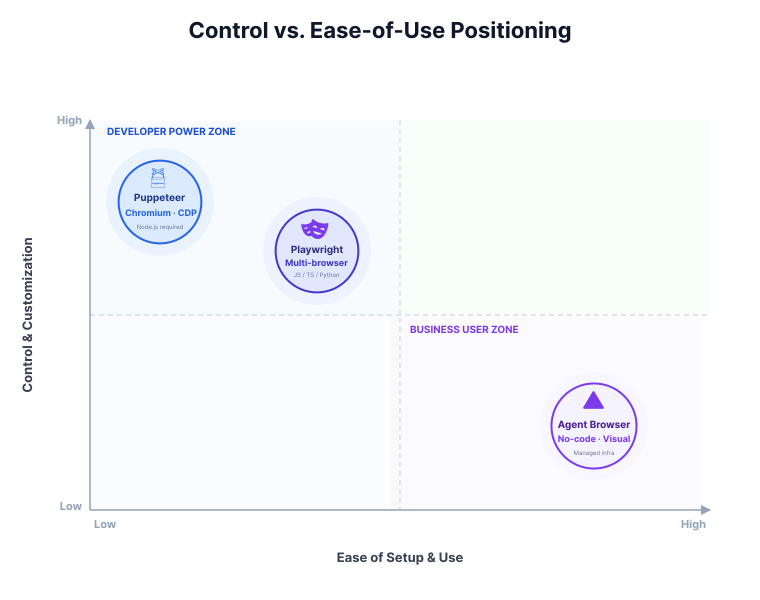
The quadrant makes the tradeoff concrete: Puppeteer and Playwright give you deeper control at the cost of more setup, while agent-browser trades some of that control for a managed, LLM-friendly workflow. The rest of this guide works through that split across browser support, architecture, developer ergonomics, LLM-readiness, and real-world tradeoffs, with a small token-count benchmark to make the page-state discussion concrete.
What changed in 2026
The comparison is more interesting in 2026 than it was a year ago because the tools are converging in some areas and diverging in others:
- Playwright is still the strongest default for engineering teams because it combines cross-browser coverage, mature debugging, and increasingly useful structured page-state features.
- Puppeteer remains relevant because many automation workloads are still Chromium-first, and direct CDP-oriented control is often enough.
- agent-browser matters because more teams are building agent loops instead of fixed scripts, which changes the value of compact snapshots, persistent sessions, and ref-based actions.
The decision now comes down to what you're optimising for: test reliability, Chromium scripting simplicity, or LLM-driven adaptability.
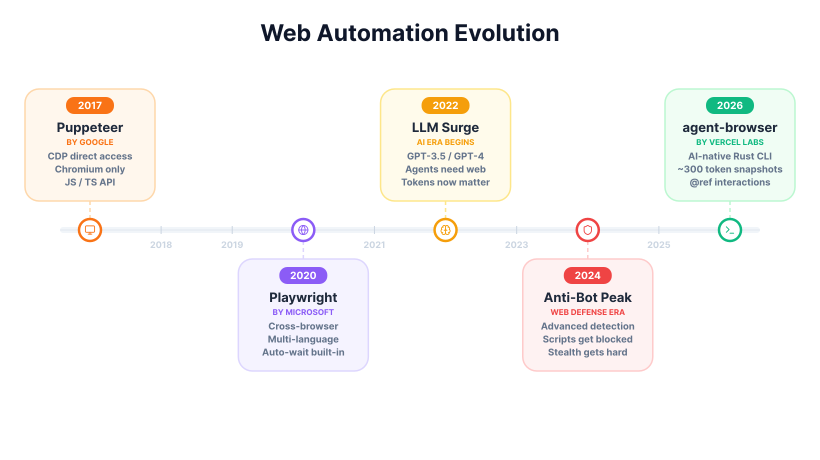
Zooming out, each of these tools reflects a distinct era in how the web has been automated - from raw Chromium scripting to cross-browser testing to the LLM-driven agents showing up now:
Token benchmark: same page, three output formats
To ground the token-efficiency discussion in something reproducible, I measured the representative contact-form example used later in this article with the cl100k_base tokenizer family commonly used for GPT-4-class workflows. This is a small serialization benchmark: it measures how much page state each format produces on one page. Navigation speed, task success rate, and anti-bot outcomes are out of scope.
The benchmark uses each tool's documented output style:
- Puppeteer:
page.content()returns the full HTML contents of the page, including the DOCTYPE. - Playwright:
locator.ariaSnapshot()returns a YAML ARIA snapshot, and AI mode can include element refs. - Vercel agent-browser: the official repository documents
snapshotas an accessibility tree with refs and a daemon-backed workflow.
| Output format | Measured characters | Measured tokens | What it shows |
|---|---|---|---|
Puppeteer page.content() | 927 | 242 | Richest raw output, but also the heaviest because it serializes page markup rather than an agent-oriented view |
Playwright ariaSnapshot() | 184 | 50 | Much smaller structured page state; good fit when you want an accessibility-first snapshot inside a broader automation stack |
agent-browser snapshot -i | 149 | 49 | Similar compactness on this simple page, with direct refs for follow-up actions |
What this benchmark supports:
- On this controlled example, raw HTML was about 4.8x heavier than Playwright's snapshot and about 4.9x heavier than agent-browser's snapshot by token count.
- Playwright and agent-browser were nearly identical on this small form, so the more important difference here is workflow shape: Playwright gives you structured page state inside a testing/automation library, while agent-browser pairs compact snapshots with direct
@refactions and persistent sessions. - The gap can widen or narrow on real sites depending on hidden DOM size, framework markup, iframes, and whether you snapshot the whole page or only interactive elements.
Treat this as a single data point: on this page, raw HTML was the heaviest format to send to an LLM, and structured accessibility snapshots were far more compact. Real sites will vary. For the broader theory behind compact page-state representations, see Snapshots Provide LLMs With Website State and DOM Downsampling for LLM-Based Web Agents.
The 3 tools
The three tools solve related problems, but they are optimized for different workflow shapes.
Puppeteer

Google launched Puppeteer in 2017 as a Node.js library designed for controlling Chrome and Chromium browsers. It operates through the Chrome DevTools Protocol (CDP), which gives developers low-level access to browser behavior. In practice it remains mostly associated with Chromium automation, though Firefox support also exists. Its API is exclusive to JavaScript and TypeScript development environments, as reflected in the official Puppeteer docs.
The tool has a sizable community, with roughly 94,000 GitHub stars as of April 2026. Puppeteer is widely used for web scraping, PDF generation, screenshots, and repeatable Chromium-first automation routines. Its main strengths are maturity and direct browser control, especially when you do not need cross-browser coverage.
Example:
const puppeteer = require("puppeteer");
(async () => {
  const browser = await puppeteer.launch();
  const page = await browser.newPage();
  await page.goto("https://example.com");
  const html = await page.content();
  console.log(html);
  await browser.close();
})();
Playwright

Microsoft introduced Playwright in 2020 to provide a unified API for browser automation and testing across multiple browser engines. Its official docs support Chromium, Firefox, and WebKit, allowing developers to run similar workflows across the major browser families. Playwright also extends beyond JavaScript and TypeScript to Python, Java, and .NET.
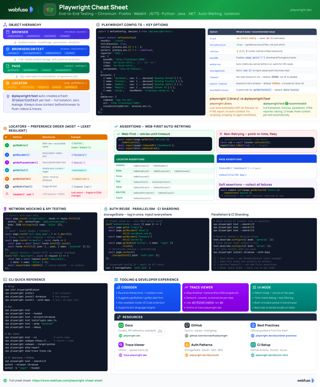
Playwright Cheat Sheet
Quick reference for Playwright primitives, locators, auto-waiting, tracing, and browser contexts.
View cheat sheetPlaywright has grown quickly, with about 85,000 GitHub stars as of April 2026. Its major capabilities include auto-waiting and actionability checks, browser contexts for session isolation, tracing, a built-in test runner, and extensive device emulation. That combination makes it a common default for end-to-end testing, complex browser workflows, and cross-browser automation.
For AI-oriented workflows, ariaSnapshot() is usually a better fit than page.content() because it returns a compact accessibility tree instead of raw HTML.
const { chromium } = require("playwright");
(async () => {
  const browser = await chromium.launch();
  const page = await browser.newPage();
  await page.goto("https://example.com", { waitUntil: "networkidle" });

  const snapshot = await page.locator("body").ariaSnapshot();
  console.log(snapshot);

  await browser.close();
})();
Vercel agent-browser

Vercel agent-browser is a Rust-based command-line interface (CLI) and daemon designed for AI-agent workflows. It is under active development, with 0.25.x releases available as of April 2026. The official repository describes a client-daemon architecture that communicates via CDP and does not require Node.js for the daemon, while still being able to use existing browser installations.
The tool's main innovation lies in its snapshot capability. This command generates an accessibility tree and assigns @refs (for example @e1) to interactive elements, which makes follow-up actions easier for an LLM to map back to the page. Optional annotated screenshots provide visual context. It's newer than Puppeteer or Playwright, and positioned squarely around LLM-driven browser workflows.
Example:
# Terminal/LLM shell commands
agent-browser open https://example.com
agent-browser snapshot -i   # Returns refs for interactive elements
agent-browser click @e2     # Uses a ref from the latest snapshot
agent-browser screenshot result.png
Adoption in 2026
As of 2026, Puppeteer and Playwright remain widely used in scripted automation and testing, while Vercel agent-browser is drawing growing attention in AI-agent workflows. The deeper split is product shape: Puppeteer and Playwright target deterministic automation first, while agent-browser is built around agent-readable page state and command-driven interaction.
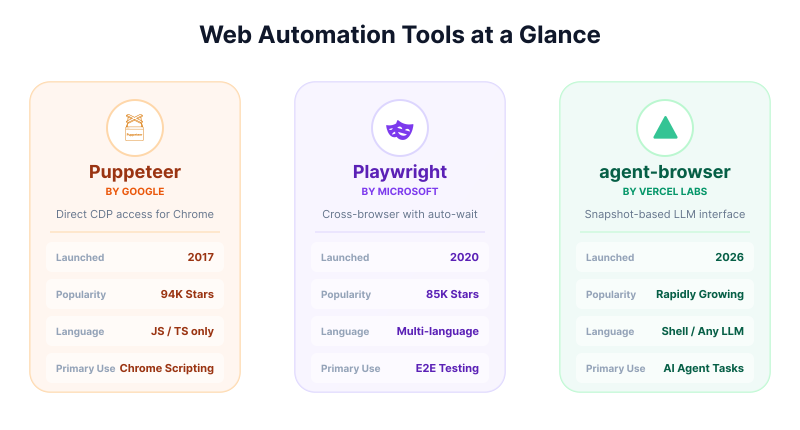
Side-by-side, the three tools profile very differently - a mature JS-only Chromium library, a cross-browser testing default, and a young CLI built for LLM loops:
Comparison table
Here are the core differences side by side.
| Best for | Puppeteer | Playwright | Vercel agent-browser |
|---|---|---|---|
| Browser support | Mostly Chromium | Chromium, Firefox, WebKit | Mostly Chromium |
| API style | JS/TS library | Multi-language library | CLI + daemon |
| Workflow style | Scripted steps | Scripted steps + auto-wait | Agent loop + refs |
| LLM readiness | Low | Medium | High |
| Session handling | Manual | Browser contexts | Persistent daemon |
| Best use case | Simple Chromium tasks | Default choice for most teams | Open-ended AI agent workflows |
| Main tradeoff | Limited browser coverage | More tooling than Puppeteer | Newer and less mature |
In practice, the pattern is simple: Playwright is the safest default, Puppeteer is the leaner Chromium-first option, and agent-browser is strongest when an LLM needs compact page state and ref-based actions.
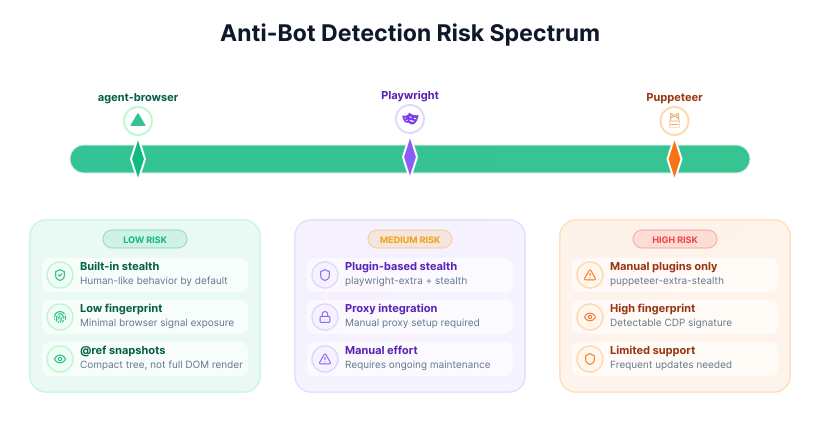
A related tradeoff is how well each tool hides from anti-bot systems out of the box, and how much stealth work you're expected to bolt on yourself:
All three launch a fresh browser.
Webfuse connects your agent to the live one.
When to choose each tool
The right choice depends on the shape of the work. Each tool is sharpest at a distinctly different cluster of use cases - precise Chrome scripting, reliable cross-browser testing, or AI-native web interaction:
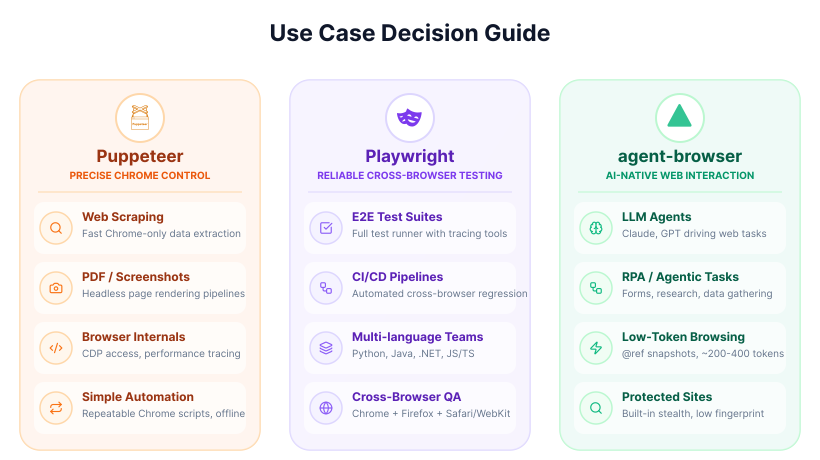
Start with the workflow shape: choose Playwright for deterministic, test-like workflows; choose Puppeteer for Chromium-only scripted control; choose Vercel agent-browser when the next step depends on model interpretation of the current page.
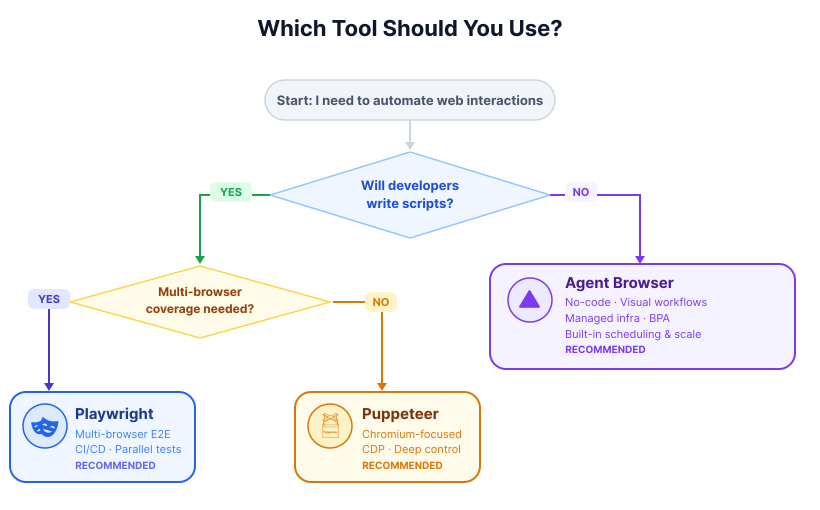
If it helps to see the same decision as a flowchart, the two questions that matter most are whether you're writing scripts at all, and - if so - whether you need multi-browser coverage:
Sources
The comparison in this article is based primarily on official product documentation and repository materials reviewed in April 2026, with secondary context from industry comparison articles and community discussions.
- Official sources reviewed:
- Playwright documentation:
playwright.dev - Puppeteer documentation:
pptr.dev - Vercel agent-browser repository and docs:
github.com/vercel-labs/agent-browserandagent-browser.dev
- Playwright documentation:
- Secondary sources:
- Comparison articles from browser automation vendors and tooling blogs
- Community discussions about automation reliability, scraping maintenance, and agent workflows
Because these tools are evolving quickly, especially in the AI-agent category, it is worth checking the latest official docs before making architecture decisions based on version-specific features.
Conclusion
Playwright remains the strongest default for most engineering teams because it combines reliability, cross-browser automation, and mature tooling. Puppeteer still fits focused Chromium scripting, while Vercel agent-browser shines when the browser is part of an LLM-driven agent loop.
Frequently Asked Questions

Next Steps
Connect an agent to any web app
No signup, runs in your browser
Ready to let your AI agent act on the live web?
Headless browsers give your agent a copy of the web. Webfuse gives it the session your user is actually in — over MCP, with no install.
- No credit card
- Free forever plan
- Quick setup
Related Articles